Saturday, 23 March 2019

Xda-Developers | Xiaomi Mi 5/5s/5s Plus, Mi Mix, Mi Note 2, and Nextbit Robin get support for LineageOS 16 based on Android Pie

If you are interested in modding your device, whether it's in the short or long term, Xiaomi devices are great choices. The cheap prices of their smartphones coupled with custom development-friendliness helps a lot. One of the best ROMs available for these phones (and pretty much any phone, while we're at it) is LineageOS. Everyone's taste in ROMs is different, but LineageOS strikes a nice balance between pure stock Android and other feature-rich distributions. It adds a lot of features, but keeps all the unnecessary/gimmicky stuff out of the door. The Lineage team recently launched LineageOS 16, the latest iteration of their custom software, which is based on the Android Pie release.

Now, support for LineageOS 16 is coming to a handful of Xiaomi devices starting this week. This includes the Xiaomi Mi 5 as well as the Xiaomi Mi 5s and the Xiaomi Mi 5s Plus, the Xiaomi Mi Mix, and the Xiaomi Mi Note 2 as well. Support for LineageOS on these devices has existed for a long time now, but until now, only LineageOS 15.1—based on Android 8.1 Oreo—was officially available for these devices.

As a bonus, the Nextbit Robin (the first and only device made by Nextbit before the Razer acquisition) is also getting support for LineageOS 16. Unlike the other devices we just mentioned, the Nextbit Robin will have both LineageOS 15.1 and LineageOS 16 builds available for it. According to the LineageOS team, this is done since LineageOS 16 does not currently support VoLTE. Some people, particularly those in India, need VoLTE, so LineageOS 15.1 builds will still be provided for the time being for those who need it.

If you're interested in installing LineageOS 16 in your device, head over to your device's section and download it now!

Download for the Xiaomi Mi 5

Download for the Xiaomi Mi 5s

Download for the Xiaomi Mi 5s Plus

Download for the Xiaomi Mi Mix

Download for the Xiaomi Mi Note 2

Download for the Nextbit Robin

Do you like LineageOS? Let us know in the comments down below.

Nextbit Robin Forum

Xiaomi Mi 5 ForumXiaomi Mi 5s ForumXiaomi Mi 5s Plus Forum

Xiaomi Mi Mix ForumXiaomi Mi Note 2 Forum

The post Xiaomi Mi 5/5s/5s Plus, Mi Mix, Mi Note 2, and Nextbit Robin get support for LineageOS 16 based on Android Pie appeared first on xda-developers.


Android Authority | Roku Streaming Stick Plus review

There was a time when, if I wanted to watch a movie at home, I needed to get a copy on a VHS cassette! Then came DVDs, and VHS went the way of the dodo. But that was then, and now DVDs look almost prehistoric due to streaming services. We stream movies from services like Amazon Prime or Netflix. We watch videos on YouTube and we catch up with our TV viewing via TV streaming services like Hulu or iPlayer.

Watching streaming video on a smartphone, tablet, laptop or desktop is easy. You just point your web browser at the relevant website. But what about on your TV? If you have a "smart" TV, then it probably has built-in apps for YouTube, Netflix, Plex, etc. It might also have access to Amazon Prime and Google Play Movies & TV.

But how do you watch streamed video on a not-so-smart TV? Or on a TV that has an app missing for one of the services you use? Roku, that's how!

Roku has a range of "players" that connect to the HDMI port on your TV and allow you to use services like YouTube, Netflix, and Google Play Movies & TV directly on your TV. I have been testing out one of the more high-end players, the Roku Streaming Stick Plus.

Here's my Roku Streaming Stick Plus review.

Setup

In the box you get the Roku Streaming Stick Plus itself — which connects directly to the HDMI port on your TV — as well as a Roku remote control, a USB power supply to power the stick, the USB power cable, and a USB extension cable in case your main outlet isn't close to your TV. The USB power cable is proprietary, as it has some extra receiver tech built into a small capsule part way along the cable.

The physical setup is easy. You put the Streaming Stick Plus into the HDMI port of your TV, connect the USB cable to the stick and the power supply, and then plug in the power supply. If the space around the HDMI port is tight, then you will need a male-to-female HDMI cable, sometimes known as a "port saver" or a HDMI extender. You don't get one in the box, but apparently Roku will send you one for free.

Your TV will probably switch automatically to the new HDMI input. If it doesn't, you will need to select the right "source" using your TV's remote.

Now you need to configure your Streaming Stick Plus. First, you may need to pair the Roku remote with the Roku stick. Then you need to connect the Stick Plus to your Wi-Fi network. A list of available networks will be shown and then, using the remote control, you can pick your network. You will also need to enter the Wi-Fi password using an on-screen keyboard and the remote. It's a little laborious, as you have to pick each letter individually using the remote, but you only ever need to do this once, so fear not!

Along the way you will be able to pair the Roku remote with your TV, so you can control the volume and power using the Roku remote.

At this point, the Roku will check if there are any software updates available. They will be downloaded and installed accordingly.

Next, the Roku Streaming Stick Plus needs to understand what type of TV you have, what type of resolution it supports, and what type of HDMI connection you have. I found that all the automatic tests for this worked flawlessly and it guessed the configuration correctly.

Once the Stick Plus is talking to your remote, network, and TV correctly, you need to activate the device. This means you need to use a smartphone or a PC to connect to Roku's website (using the website address shown on your TV).

You will need to create a Roku account if you don't already have one. After that, you will need to enter the shown unique code from your Stick Plus. Once the activation is completed on the Roku website, the Stick Plus will automatically move onto the channel setup phase.

The biggest problem with the whole setup process is that you must enter some form of payment details to progress any further. This step is mandatory and can't be skipped. Payments are accepted via credit/debit cards and via PayPal. While it is possible to use Roku without ever incurring any charges, the service asks for these details so that you can "easily rent/buy movies on demand or try popular streaming channels."

I double checked with Roku and unfortunately this stage can't be skipped. This might be a dealbreaker for some people. However Roku did add that "you will never be charged without your explicit consent." In fact, there are several warnings before you actually make a purchase, meaning it is nearly impossible to be charged by accident.

Roku's players borrow the vocabulary of broadcast TV, so each streaming service is called a "channel." During the channel setup phase, you select different services from the list of available services. Popular services include Netflix, YouTube, Amazon Prime, Google Play Movies & TV, and Plex. There are also simple games which can be added, plus some media apps like wallpapers from the popular photos sites, or playing video from any DLNA servers on your network.

Usage

Using the Stick Plus is simple enough. The remote is a "point anywhere" device, which means it doesn't need to be pointed directly at the Stick Plus. If you think about it, that's quite handy because the dongle itself is probably around the back of your TV!

To watch a channel you just select it from the main channel UI and it will load an app. Then, you will be presented with the relevant UI for that service. In other words, YouTube looks like YouTube, Netflix looks like Netflix, and so on!

Also read

The biggest headache is when you need to search for content inside the channel. If you are looking for a certain video clip in YouTube, then you need to go to the search function and then peck away at the remote to find and enter each letter for your search term.

Thankfully, there is also a remote Roku app for Android. The remote app mirrors the functionality of the physical remote, but it also adds new capabilities. For example, the home screen allows you just to tap the channel you want (without having to navigate to it with the direction keys); there's also the ability to use the on-screen keyboard to enter text directly on the Streaming Stick Plus.

My favorite functionality of the Roku app is the "Private Listening" feature. With Private Listening, the audio from the Roku doesn't come out from the TV, it is rerouted to your smartphone. This means you can plug headphones into your smartphone and listen to what is being streamed. Great for those who live in busy households!

Performance

As you would expect from a device designed specifically for streaming video over the internet, the Roku Streaming Stick Plus is very good at streaming video over the internet.

During my time with the Roku Streaming Stick Plus, I never noticed any glitches or lags that would be attributable to the stick itself (sometimes my internet connection can be a little temperamental).

The Streaming Stick Plus sets itself apart from many other sticks/dongles (from Roku and others) in that it supports 4K at 60 frames per second, it supports HDR, and it has 802.11ac dual-band MIMO Wi-Fi, with an enhanced wireless receiver that offers up to 4x range.

Obviously, to watch 4K movies, you need a 4K TV, plus the source needs to be 4K. Likewise for HDR, you need an HDR-compatible TV and the content needs to be in HDR. For both 4K and HDR, your TV needs to support HDMI HDCP 2.2.

Alternatives

The Roku Streaming Stick Plus costs $59.99. 

If you don't need 4K or HDR support, then Roku also offers the standard version of the Streaming Stick sans the "plus" for $49.99. It supports 1080p and also has built-in 802.11ac dual-band MIMO Wi-Fi. If you don't need 802.11ac, then the Roku Express also supports Full HD and uses 802.11 b/g/n. You can pick up a Roku Express for just $29.99.

Besides Roku's offerings, there are alternatives from Google — Chromecast Ultra — and Amazon's Fire TV Stick. Then there are also a plethora of no-name Android media boxes.

The verdict

Streaming is a big part of how we consume media in our household. We actually haven't watched broadcast TV for a couple of years and our satellite receiver is no longer connected to the TV.

However, we do have lots of streaming devices. I think it is fair to say that the Roku Streaming Stick Plus is one of the most comprehensive and yet easy to use devices that I have tested. Compared to the other devices we use in our house, the Roku has the advantage that it isn't from Google or Amazon. Google's Chromecast and Amazon's Fire TV are probably the most popular streaming devices for Android users, but the two companies also happen to be rivals (Amazon Video vs Google Play Movies & TV; Google Home vs Amazon Alexa; etc). That means each would prefer you to stick within the confines of its walled garden. For example, Amazon Video isn't compatible with Google's Chromecast. Roku doesn't suffer from this problem and is able to offer support for a full range of services including those from Amazon and Google.

If you have Google and Amazon subscriptions, maybe the Roku is the easiest way to get the best of both worlds.

Affiliate disclosure: We may receive compensation in connection with your purchase of products via links on this page. The compensation received will never influence the content, topics or posts made in this blog. See our disclosure policy for more details.


Techcrunch | A week of game streaming and earthquakes

From Extra Crunch

Wide Angle

Photo by Antonio Masiello/Getty Images

Stories from outside the 280/101 corridor


https://ift.tt/2TpVvi4

Imore | FUN! FUN! Animal Park for Nintendo Switch: Everything you need to know

FUN! FUN! Animal Park is a collection of one or two-player minigames that you can play with your kids, coming exclusively to the Switch.

Looking for a fun game to play with a kid, or a safe game for two young kids to play together? Aksys Games is coming out with FUN! FUN! Animal Park exclusively for the Nintendo Switch, which is a simple-to-understand, kid-friendly co-op game that features adorable animal friends and games that will keep them busy while not containing any objectionable content.

See at Amazon

There are three total game modes and 30 different minigames to choose from. Here's everything else you need to know about FUN! FUN! Animal Park:

What is FUN! FUN! Animal Park?

FUN! FUN! Animal Park is a collection of animal-themed minigames for one or two players. The minigames can be played for fun or competitively, and are all simple enough that the collection as a whole is great for kids to try. Every minigame features at least one cute animal, and players are guided and taught how to play by a stuffed lion and bunny who make the rules simple to follow.

Because the game is exclusive to the Nintendo Switch, it is able to take advantage of the console's features - many of the games feature motion controls as a result.

What modes are there to play?

FUN! FUN! Animal Park has three game modes:

  • Tour Mode - This guided mode takes players through minigames in a particular order with a loose storyline as they seek the "champion" of Animal Land
  • One Match Mode - Player choose a single game and compete in it
  • Solo Mode - This allows solo players to try and beat saved high scores in specific games

What are all the minigames?

Here are all the minigames we know of so far in FUN! FUN! Animal Park. There are 30 total, and we do not know the official names but can see the games in the trailer and screenshots:

  • Doggie Obstacle Course
  • Kangaroo boxing
  • Pig racing
  • Pandas balancing on beach balls
  • A quiz involving various animals
  • Sheep Shearing
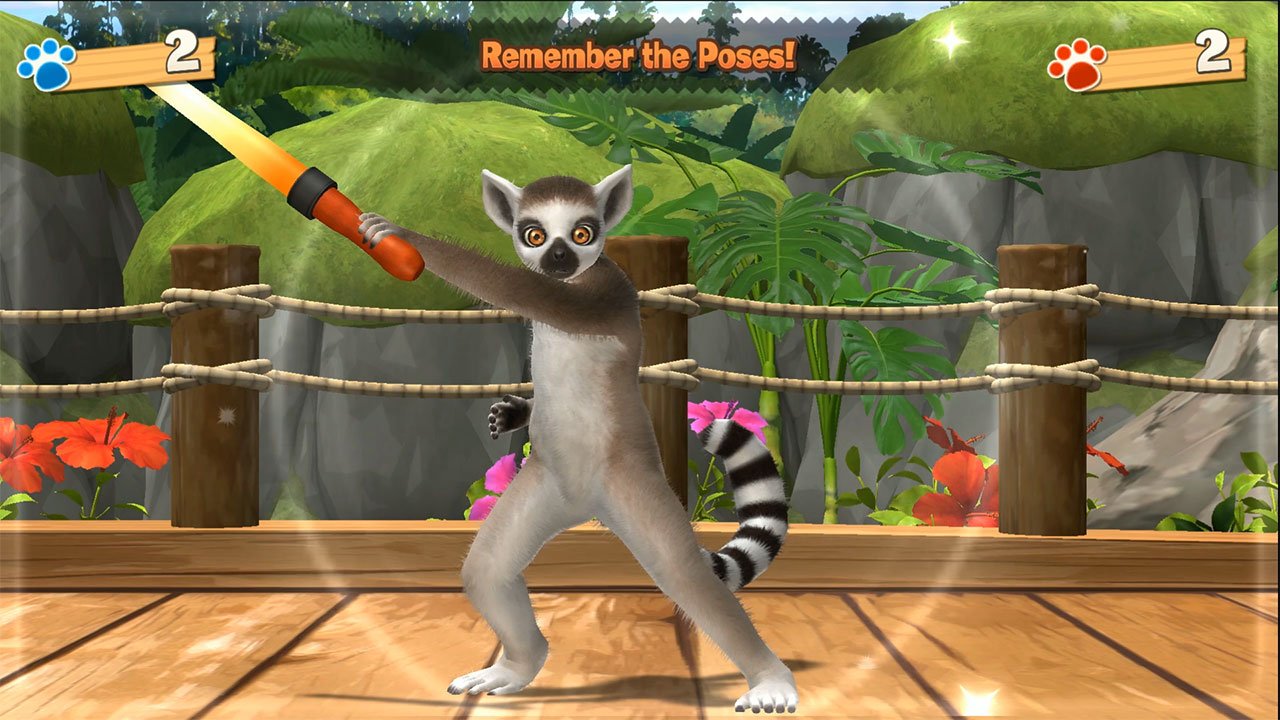
  • Lemurs collecting apples
  • Penguin sliding

Can I play with a friend?

FUN! FUN! Animal Park allows you to play with up to one other person in either Tour Mode or One Match Mode. Online play is not available for this title - you can only play together locally on a single Nintendo Switch.

When can I play?

FUN! FUN! Animal Park is planned for release on the Nintendo Switch on March 28, 2019, and will cost $29.99.

See at Amazon

Any questions about FUN! FUN! Animal Park

If you're still not sure if you and your family want to adventure into the animal park, ask any questions you have in the comments below!


Techcrunch | Corporate biotech venture funding rises again

Biotech venture funding has been on a tear for the past couple of years, and corporate investors in the space are doing their part to boost the totals.

Here at Crunchbase, we've put together an index of the largest pharma and biotech companies active in startup investment, along with their in-house venture arms. For the second year in a row, we're tallying their venture investments by round count and dollar totals.

The broad finding? Corporate biotech investors sharply increased the sums put into startup rounds they led in 2018. Overall, they also participated in rounds that were valued at nearly twice year-ago levels.

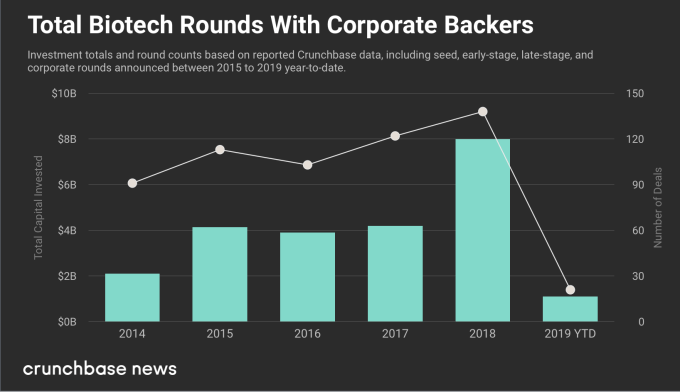
These aren't small sums either. In all of 2018, corporate venture investors participated in rounds valued at $8 billion. Rounds with a corporate bio VC as lead investor, meanwhile, totaled around $1.7 billion.

Below, we drill down into a bit more detail, looking at funding totals for the past five years, largest rounds and most active investors.

As bio deals balloon, corporate VCs get spendier

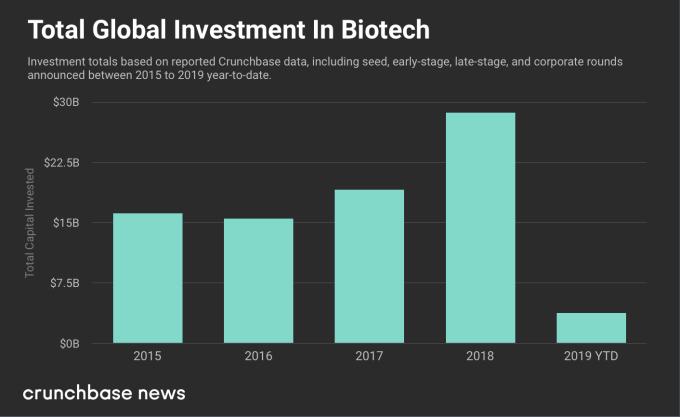
First, it's worth noting that overall global biotech venture funding rose sharply last year and has been running at historically high levels for the past few years.

For 2018, biotech startups globally raised just shy of $29 billion in seed through late rounds from all investors, according to Crunchbase data. That's up from $19 billion in 2017.1


Most biotech deals do not include a corporate backer, but a pretty substantial minority do. In 2018, investors in our corporate biotech index participated in 138 seed, venture or growth-stage funding rounds, up from 122 in 2017.

Round counts did not rise as much as investment totals, as the average biotech deal has been getting bigger. The sector has not been immune from the rise of supergiant funding rounds, and deals valued in the hundreds of millions have become far more common.

That's reflected in the funding totals. Altogether, 2018 rounds with a corporate backer were valued at $8 billion, including contributions from all investors. That's up from $4.2 billion in 2017.

They're leading more rounds, too

We also look specifically at bio funding rounds in which a corporate backer was the lead investor. In these cases, it's safe to assume that the corporate investor put up a large portion, or possibly even all, of the reported funding.

For 2018, we saw corporate bio investors leading a larger number of deals, with a much larger aggregate value than prior years.

There were a few supergiant rounds in the mix. The largest was a $300 million late-stage round for personal genetic testing provider 23andMe, led by GlaxoSmithKline.

Two others were led by Celgene. One was a $250 million early-stage round last February for Celularity, a startup it spun out to focus on cancer treatments using placental cells. The other was a $101 million round last March for Vividion, developer of a proteomic drug discovery platform.

In all, corporate bio investors led at least 30 funding rounds in 2018, with an aggregate value of $1.7 billion. That's approximately triple 2017 levels.

Active players

Of course, not all corporate bio players are equally exposed to startups. Some are far more active than others.

One example is Novartis and its Novartis Venture Fund, which has participated in 15 deals with an aggregate value of nearly $730 million since 2018. Over the past three years, it has done 40 deals, with an aggregate value of $1.6 billion.

Celgene, which agreed to be acquired by Bristol-Myers Squibb earlier this year (the deal hasn't closed yet), is another really active venture player. The New Jersey company has participated in 30 deals valued at nearly $1.8 billion over the past three years, including 13 since the beginning of 2018.

Outsourcing innovation

The rise in corporate VC investment in pharma and biotech appears to reflect the continuation of a long-term trend toward supplementing and even supplanting in-house R&D with venture investment. Recent quarters, however, demonstrate that it's becoming an increasingly expensive strategy, as round sizes grow and investors devote more dollars to funding hot startups.

  1. The numbers reported in this annual look at corporate biotech investment differ from a report on the same topic we put out a year ago. A few factors contributed to the differences, including some additions to the corporate investor list, changes in the Crunchbase data set around deal categorizations and adjustment to deal types.


https://ift.tt/2upZi4Y

Techcrunch | Planning for the uncertain future of work

In a recently published, roughly 75-page report, British non-profit organization The Royal Society for the Encouragement of Arts (RSA) outlined several scenarios for how the UK labor market will be impacted by frontier technologies such as automation, AI, AVs and more.

The analysis titled "The Four Futures of Work" was conducted in collaboration with design and consulting firm Arup and was spearheaded by the RSA's "Future Work Centre", which focuses on the impact of new technologies on work and is backed by law firm Taylor Wessing, the Friends Provident Foundation, Google's philanthropic arm Google.org and others.

The report is less of a traditional research paper and more of a qualitative, theoretical and abstract exploration of how the world might look depending on how certain technological and sociological variables (immigration, political will, etc.) develop. The authors don't try to estimate growth paths for new technologies nor do they try to reach a definitive conclusion on what the future of work will look like. The work instead looks to lay out multiple possible outcomes in order to help citizens prepare for transformations in labor and to derive policy recommendations to mitigate externalities in each scenario.

As opposed to traditional quantitative data-based methodologies, research was conducted using "morphological scenario analysis." The authors' worked with technologists, industry executives and academic researchers to identify the technological and non-technological uncertainties that will have a critical impact on the future of work, before projecting three (minimal impact, moderate impact, and severe impact) possible scenarios of how each will look by the year 2035. With input from the report's collaborators, the researchers then chose the four most compelling and sensical scenarios for how the future of work look.

The value of the report depends entirely on how readers intend to use it. If one hopes to gauge market sizes or inform forecasts or is looking for scientific, quantitative research with data — they should not read this. The report is more useful as a way to understand the different ways new technologies may evolve through thought-provoking, fun-yet-probabilistic, and poetic narratives of hypothetical future economic structures and how they might function.

Rather than summarize the four detailed scenarios in the report and all the conclusions discussed, which can be found in the executive summary or full report, here are a few takeaways and the most interesting highlights in our view:

The underwhelming:


https://ift.tt/2HBBeEB

Imore | Test your DNA and find a weight loss plan that works for you!

If you've ever tried to lose weight or are currently in the midst of a weight loss journey, you know just how hard it can be to find a diet or workout plan that gives you the results you want. We know that everyone's bodies are different, yet we all have been told that fad diet after fad diet is the ultimate answer to all our weight loss angst. Why not take a smarter approach?

Weight loss is different for anyone and is affected by not only the food you eat and the exercise you fit into your day but also your genetics. Knowing your ancestry can offer you insight into what types of food, workouts, or vitamins can help you maintain a healthy weight, and iMore Digital Offers can help!

Vitagene presents a smarter, more effective way to stay healthy—all while learning about your genetics and ancestry! With a simple cheek swab, Vitagene can provide you with health plans based on your DNA, lifestyle, and goals so you can feel healthier. You can learn how your genetics influence your diet, understand which supplements and workouts are best for you, and discover how your genes inform your global ancestry.

Normally, DNA test kits like can cost a pretty penny, but right now through iMore Digital Offers, you can get Vitagene DNA Ancestry Test Kit & Personalized Health Plan for only $79!

Stop trying every diet you can find and wasting your time and money at the CrossFit gym down the street. Use the knowledge of your genetics to inform what healthy choices look like for you, and let Vitagene help you get the results you want!

See at iMore Digital Offers