Showing posts with label Gadgets. Show all posts

Monday, 28 January 2019

Best gadgets used by hacker | Gadgets for Cyber Security Experts

In today's post, we will talk about some special gadgets that used Cyber Security Experts and Pen-tester. A professional hacker can also use these tools. If you also want to know who is that gadget? So read this post to the last.


Gadgets, Gadgets for Cyber Security Expert, gadgets for hacker


READ MORE:


Note : Everything shown is to be used for educational purpose only. All information in this presentation has the goal to teach you the techniques used by hacker in order to avoid their attacks. Please make sure before analyzing. applications that you have the approval of the owner of the applications you are analyzing. Hacking is a crime and I am not responsible for the way you use it.

These tools are very costly, and these tools are not available soon.
  • Ubertooth ONE
  • Proxmark3 kit
  • Raspberry Pi
  • LAN Turtle
  • Hackers RF ONE
  • Rubber Ducky
  • Alfa Network Board
  • Wi-Fi Jammer
  • Dark Purple USB

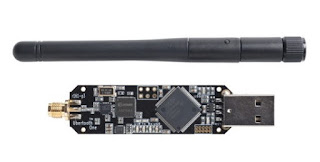
Ubertooth ONE  

This device is an open source 2.4 GHz code development platform for experimenting with Bluetooth, enabling users to appreciate the different aspects of new wireless technologies.
Ubertooth ONE, Gadgets, Gadgets for Cyber Security Expert, gadgets for hacker

Proxmark3 kit

The Proxmark3 is a device developed by Jonathan Westhues that can read almost any RFID (Radio Frequency identification) label, as well as clone and sniff them. It can also be operated in standalone mode without pc through the use of batteries. You can capture the signal very easily. You can understand it when you need it.

Proxmark3 kit, Gadgets, Gadgets for Cyber Security Expert, gadgets for hacker

Raspberry Pi 

The Raspberry Pi is a series of small single-board computers developed in the United Kingdom by the Raspberry Pi Foundation to promote teaching of basic computer science in schools and in developing countries. The Raspberry Pi is a tiny and affordable computer that you can use to learn programming through fun, practical projects. Join the global Raspberry Pi community.

RaspberryPi, Gadgets, Gadgets for Cyber Security Expert, gadgets for hacker


LAN Turtle

This type of system admin and pen-test tool provides stealthy remote access, as it stays connected to a USB port covertly. Besides this, it allow users to harvest information from the network and has the capacity to execute a MITM (man-in-the-middle attack).


LAN Turtle, Gadgets, Gadgets for Cyber Security Expert, gadgets for hacker


HckerRF ONE 

This tool insalls a powerful SDR (Software-Defined Radio) system. In other other words it is essentially a radio communication device which installs software to be used in place of typically installed hardware. This way, it is capable of processing all kinds of radio signals ranging from 10 MHz to 6 GHz from a single peripheral, which can be connected to the computer via a USB port. With the help of this tool, you can capture the calling flow.


HackerRF one, Gadgets, Gadgets for Cyber Security Expert, gadgets for hacker

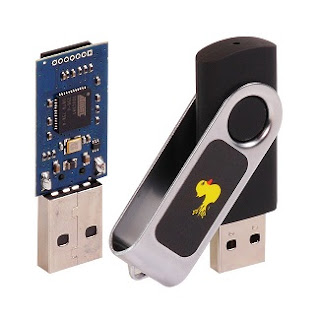
Rubber Ducky

This is special pen drive is a device that works as a programmed keyboard in the shape of a USB drive. When you plug it into a computer, it starts writing automatically to launch programs and tools which may either be available on the victim computer or loaded onto the drive’s onboard Micro SD, in order to extract information.


Rubber Ducky, Gadgets, Gadgets for Cyber Security Expert, gadgets for hacker


Alfa Network Board

A classic Wi-Fi board for injecting packet. The Alfa stands out for the quality of its materials, and for its use of chipsets which can be set to monitoring mode –a requirement of wireless audits.


Alfa Network board, Gadgets, Gadgets for Cyber Security Expert, gadgets for hacker


Wi-FI Jammer  

WiFi jammer is one of the many types of signal jammers created to help people solve different problems coming from cell phones, radio signals and wireless connections. Every kind of signal jammer is designed to work with specific frequency range, and WiFi jammer is not an exception.

WiFi signal jammer has been made to successfully block wireless signals in WiFi frequency range (2.4-2.5 GHz) and in addition it blocks Bluetooth signals because the match the same frequency range. Everything else in this type of jammer works the same as in other jammers, maybe with some minor differences.


Wi-Fi Jammer, Gadgets, Gadgets for Cyber Security Expert, gadgets for hacker


Dark Purple USB 

A Simple USB stick created by A Russian security researcher known as “Dark Purple”. Dark Purple can instantly destroy any machine it, plugs into including your PC, LAPTOP and TV. These tools can destroy the entire machine. A Russian security researcher demonstrates the destructive capability of a so called “killer USB Stick”.


Dark Purple USB, Gadgets, Gadgets for Cyber Security Expert, gadgets for hacker


So friends this is the end of the article ,if you like this post please share it your friends. thank you so much ,stay tune with this blog and blog's admin Mr. Aditya Singh

Thursday, 25 January 2018

Best Video editing apps for iOS

Best Video editing apps for iOS devices in 2018


In this article we pick the top six video editing applications for iPad, iPhone, iPod Touch for you to try different things.

The best video editing applications for iOS gadgets in 2018.

1-iMovies:

Best Video editing apps for iOS devices in 2018


iMovie imports video film to the Mac utilizing either the FireWire interface on most MiniDV design advanced camcorders or the PC's USB port. It can likewise import video and photograph records from a hard drive. From that point, the client can edit the photographs and video clasps and include titles, topics, music, and impacts, including essential shading redress and video improvement instruments and changes, for example, blurs and slides.

Download iMovie App from

2-Cute CUT:


Best Video editing apps for iOS devices in 2018


CuteCut is a charming and keen video supervisor, let you edit and make video effortlessly.

The majority of all, it is finished free, and no watermark.

Principle highlights:

- Make video with photograph and recordings.

- cut video rapidly

- combine recordings effectively, unique organization recordings likewise can be consolidated.

- add music to video, make your own particular music video!

- remove sound from video

- share video with your companions

Download Cute Cut from iTunes

3-Vimeo:

Best Video editing apps for iOS devices in 2018


Find astounding recordings from the world's best makers, and transfer your own—all on your iPhone and iPad—with Vimeo for iOS.

Watch and offer recordings in beautiful HD, less the promotions, and take after classes, channels, and accumulations to fill your sustain with astonishing stuff every last day. No opportunity to watch? Spare recordings for disconnected survey. Have your own stuff to share? Transfer recordings from anyplace, and get to them whether you're at home, or in a hurry.

With Vimeo for iOS, you can:

Watch recordings in lovely promotion free HD

- Stream recordings in full 1080p HD

- Rejoice in Vimeo's dependably advertisement free playback

- Add recordings to your Watch Later line

- Save recordings to watch disconnected

Download Vimeo


4-Clipper:

Best Video editing apps for iOS devices in 2018


"[Clipper] encourages you make fun and intriguing recordings without doing any hard editing work." 4.5 Stars - AppAdvice

Transform your video cuts into astonishing smaller than normal motion pictures with Clipper, the moment video supervisor. Orchestrate cuts, edit, include music, and apply impacts in seconds. At that point spare your magnum opus to your camera roll or offer by means of email, Twitter, and Facebook.

Download Clipper


Read also: Best iPhone, iPad and Android games

5- Pinnacle Studios:

Best Video editing apps for iOS devices in 2018


Ideal for portable writers and inventive movie producers. Edit video, sound and photographs at the speed of your inventiveness. Quickly orchestrate your clasps on the Storyboard, without surrendering the exactness and control of the full Timeline. Include advances, speed and montage impacts. Make and tweak titles, and construct soundtracks for your motion pictures. Appreciate 1080p yield and offer your film specifically to YouTube, Facebook, or send your venture to Pinnacle Studio Pro (accessible in the App Store) for considerably more effective editing in a hurry!

Effectively Access Your Media

• Work with any media on your gadget—video, sound and photographs

• Capture video and photographs from inside the application

• Use the "Open In" highlight to open perfect records from other different applications

• Transfer ventures (with media) between Pinnacle Studio Pro and Pinnacle Studio for Windows

• Download media from iCloud Photo Library specifically from the application library

Improve

• Use Montage layouts to make multi-layer 3D livelinesss, changes and titles

• Help your story stream with 16 changes, including top notch breaks up, blurs and the sky is the limit from there

• Generate proficient looking movement titles and illustrations with full control over content, textual style, shading, size, position and turn

• Create astonishing Picture-in-Picture impacts with full control over position, size and turn

• Pan and zoom on your photographs to make high-affect slideshows

• Create moderate movement/quick movement for video and sound and keep up sound pitch

Download Pinnacle Studio

6-Splice – Video Editor:

Best Video editing apps for iOS devices in 2018


Straightforward yet intense, Splice makes it simple to make completely tweaked, proficient looking recordings on your iPhone, iPad or iPod touch. Envision the execution of a work area editorial manager, upgraded for your cell phone. Simply tap to trim clasps, edit changes, include moderate movement impacts and more to make delightful recordings you'll want to share. It's never been less demanding to edit like a star in a hurry.

[Works with photographs and recordings caught with your GoPro and phone.]

Intense EDITING TOOLS MADE SIMPLE

+ Automatically match up your video to the beat of the music.

+ Apply channels and change foundation hues, introduction and the sky is the limit from there.

+ Add title slides, content overlays and a custom outro.

+ Adjust playback speed for quick or moderate movement.

+ Trim, cut and harvest your photographs and video cuts.

+ Choose your change style and control the speed between advances.

+ Bring your photographs to existence with dish and zoom impacts.

Download Video Editor

Read also: This is how to restore Hidden pre-installed iPhone apps

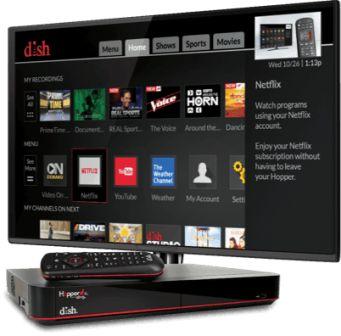
Let's talk about Dish Voice Remote: smart remote

Dish Voice smart Remote 

Dish Voice Remote: smart remote

The Dish Voice Remote is a remote control that accompanies more up to date Dish Network items and administrations – or you can purchase the remote independently for a somewhat more seasoned framework as a redesign. On the off chance that you like instructing your TV as opposed to pushing an excessive number of catches, look at the surveys for this new component!

Satellite Reviews


There are a couple diverse new Dish remotes, yet Satellite Reviews concentrated on the rendition with the touchscreen, which enables you to push down on a side catch and address the remote orders like, "Guide" or "search " to discover what you're searching for. You can likewise accomplish more entire looks for things like films with a particular performing artist, amusements with a particular games group, et cetera. SR's tests demonstrated that the voice acknowledgment shows up to a great degree exact, most likely because of the short-run nature of the mic.

Dish's Voice Remote goes for $30 at this moment (exceptional valuing as it might increment to $50 sooner rather than later). It's likewise just perfect with the Hopper 3 DVR and 4K Joeys. In this way, in the event that you have more established hardware introduced and are for the most part content with your program guide and setup, it's presumably not worth the overhaul only for the remote. 

In any case, on the off chance that you've been wavering about moving up to the Hopper 3, the Voice Remote may simply tip the scales for ya. It unquestionably gives you a chance to explore snappier and all the more proficiently… and truly makes the entire procedure of finding and sitting in front of the TV programs a considerable amount more pleasant.

what users say?

Dish Voice Remote: smart remoteDish Voice Remote: smart remote


Users truly couldn't have cared less for the touchscreen part of the new remote! Some found that, on account of the measure of the remote, it regularly needs two hands to utilize the touchscreen precisely, and that it was too simple to push the wrong secure and end some place off-base. Others found that the touchpad failed or had different issues (despite the fact that to be reasonable others truly delighted in it) – so it's apparently better not to buy the Voice Remote just for this part.


Tuesday, 23 January 2018

Apple HomePod vs. Google Home

Apple HomePod vs. Google Home technical specifications


Apple HomePod  vs. Google Home
Apple HomePod  vs. Google Home

APPLE HOMEPOD VS. GOOGLE HOME

US price
$349
$129
Responds to voice commands
Yes
Yes
Always listening
Yes
Yes
Wake word
"Hey Siri"
"OK Google," or "Hey Google"
Music streaming options
Apple Music (different choices unknown)
Google Play Music, YouTube Music, Spotify, Pandora, TuneIn
Smart home partnerships
Will likely work with Apple's set up HomeKit accomplices: Ecobee, Honeywell, Chamberlain, D-Link, August, Kwikset, Philips Hue, Lutron, iDevices and more
Nest, Honeywell, SmartThings, Wink, Belkin WeMo, Philips Hue, Lifx, Lutron, August, Logitech Harmony, Anova, IFTTT and others 
Customizable appearance
No
Yes
Output to stereo system
Unknown
Yes, via Chromecast
Synced audio playback to multiple devices
Probably: Apple reported synchronized multiroom sound as a component of iOS 11 s 
Yes, to any Google Cast device
Personal assistant highlights
News briefings, dialect interpretation, climate, activity information, set updates, play podcasts
Search Google, get a customized every day preparation, check movement, check your date-book, influence a shopping to list, check flight status, track a bundle 
Other features
Send messages, in addition to we'll unavoidably discover parts more in the months ahead ht status, track a bundle 
Cast to your TV with Chromecast, dispatch and control YouTube or Netflix by means of Chromecast s, track a bundle 

Conclusion :


Apple's street to triumph will be a thin one. Regardless of whether it sounds awesome, you'll likely have the capacity to get an alternate incredible speaker HomePod. In any case, given Apple's notoriety, the HomePod can win. To do as such, it needs to put music at the bleeding edge, while ensuring it can at any rate keep up on alternate fronts that influence the Google To home so helpful.

Sunday, 21 January 2018

Roost Smart Battery review

Let's talk about Roost Smart Battery 


Roost Smart Battery review


While fund-raising on Kickstarter in 2014, a major piece of the lift pitch for Roost - a startup situated in Sunnyvale, California - was that its Wi-Fi-empowered smoke alert battery would everlastingly expel the center of the night "low-battery peep" that is the bad dream of property holders and loft inhabitants all over the place.

Does the Roost convey? All things considered, we won't know whether its cell phone based low-control notifier works at any point in the near future, since its battery life is evaluated at five years. In any case, we can reveal to you that the $35 unit - which replaces the 9-volt battery in your standard smoke or carbon-monoxide locator - functions admirably on almost all different records, conveying notices to your cell phone wherever you are the point at which a smoke or CO occasion is identified in your home.

At $35, it's a less demanding spend too much than the comparatively pointed $100 Nest Protect , and a more cost-accommodating approach to tidy up your entire home of indicators also. The Roost Smart Battery isn't as brilliant or highlight rich as the Nest Protect 2.0, so it's not the ideal choice for everybody, particularly not those hoping to assemble an interconnected savvy home as Nest plays better with others. 

Be that as it may, for those searching for fundamental availability without issue, I like the Roost Smart Battery. It extremely just completes a certain something, yet that is all it's promising, and it satisfies that guarantee with clean and energy.


Roost Smart Battery review


What is good


If you can introduce a battery, you can introduce the Roost Smart Battery into your current smoke identifier, and it will dependably send you push warnings when your caution sounds. Both the battery and the application are appealingly outlined and simple to utilize.

What is bad


Roost offers the alternative to "rest" your caution, however that won't work if your alert is hardwired and the 9V is going about as a reinforcement. Perch doesn't offer any interconnectivity to other shrewd gadgets. 

Read also: 4 of the best Wireless Home Security Cameras 2018

We can say


You won't get the same number of smarts with the Roost Smart Battery as you would with a discount associated substitution, however at $35, it's a suitable and savvy alternative for basic, retrofit smarts.

Administering the Roost 


I found the Roost Smart Battery invigorating in a couple of ways. It's not showy, but rather it is alluring. It didn't need to be appealing, since you'll never observe it once you stick it in your smoke finder, however I valued the touch.

Friday, 19 January 2018

The Best Wireless Home Surveillance Cameras 2018

4 of the best Wireless Home Security Cameras 2018


Little, independent Wi-Fi surveillance cameras  are not very difficult to set up, can stream video to your telephone, tablet or PC, and will send you notices in the event that they identify movement or noisy clamors. Most cameras additionally give night vision and programmed movement initiated recording.

Here's 4 of the best security cameras this year

NETGEAR ARLO Q


VIDEO RESOLUTION / FRAME RATE 1080p / 30 fps 

NETGEAR ARLO QFIELD OF VIEW  130 degrees 

NIGHT VISION  25 feet 

CONNECTIVITY  802.11 b/g/n 

AUDIOBuilt-in amplifier and speaker 

CLOUD STORAGE   7 days' without recording; longer periods begin at $10/month 

Neighborhood STORAGE  None 

With its first class video quality, superb movement recognition, adaptable booking and instinctive UI, the Netgear Arlo Q would be a contender for the best prize even without its exceptionally liberal essential cloud-membership design. That arrangement gives you the previous week's accounts at no cost for the lifetime of the unit, and more than legitimizes the unit's generally high cost. The Arlo Q is the Wi-Fi surveillance camera to beat.


BELKIN NETCAM HD+

BELKIN NETCAM HD+

VIDEO RESOLUTION / FRAME RATE 1280 x 720/25 fps

FIELD OF VIEW  95 degrees

NIGHT VISION  850  nm IR LEDs, 26 feet

CONNECTIVITY  802.11b/g/n

AUDIOBuilt-inmouthpiece and speaker

CLOUD STORAGE  $9.99 every month for 14 days' recording

Neighborhood STORAGE  None

The Belkin NetCam HD+ is anything but difficult to set up, offers distributed storage for $9.99 every month and serves as a two-way radio. In addition, you can utilize the NetCam to control WeMo home extras like lights and electrical switches, which changes this gadget from a basic surveillance camera into a home-mechanization framework. We were somewhat frustrated with the video quality and the way that the camera's WeMo usefulness is contained in a different application, yet the NetCam has a decent blend of highlights and reasonableness.


NEST CAM INDOOR

VIDEO RESOLUTION / FRAME RATE  1920 x 1080 / 30fps

NEST CAM INDOORFIELD OF VIEW   130 degrees

NIGHT VISION8 IR LEDs, 25 feet

CONNECTIVITY  802.11b/g/n Wi-Fi, Bluetooth Low Energy

AUDIOBuilt-in  amplifier and speaker

CLOUD STORAGE Starts at $10/month for 10 days' recording

Nearby STORAGE  None

The Nest Cam Indoor is the third era of the observed Dropcam, and knocks up its forerunners' video quality to 1080p. It's anything but difficult to set up and, because of its attractive, swiveling base, can be introduced anyplace inside. The video looks sharp; night vision is clear; the camera can be utilized as a radio; and it connects with the Nest Thermostat and the Nest Protect smoke identifier, and additionally various outsider shrewd home gadgets. In any case, to truly make utilization of the camera's highlights, you'll need to spend $10 or more every month for the Nest Aware program, which gives you access to distributed storage and significantly more.


NETGEAR ARLO PRO

VIDEO RESOLUTION / FRAME RATE 1280x720 / Variable, up to 24fps

FIELD OF VIEW   130 degrees

NIGHT VISION  8 IR LEDs, 25 feet
NETGEAR ARLO PRO 
CONNECTIVITY    802.11n Wi-Fi, 2.4GHz

AUDIOBuilt-inmouthpiece and speaker

CLOUD STORAGE    7 days' sans recording; longer periods begin at $10/month

Nearby STORAGE   None

Netgear's new Wi-Fi camera works both inside and outside, and is fueled either by a battery or a power line. Like its more established kin the Arlo Q, the Pro has movement discovery, night vision and a radio capacity, yet like the first Arlo, it's weatherproof, has 720p video determination with a 130-degree field of view, and needs a base station to work. You'll likewise get Netgear's liberal cloud-membership design, which offers 7 days of film for nothing.

Monday, 15 January 2018

Let's Talk about HomePod

Talk about HomePod


Apple homepod


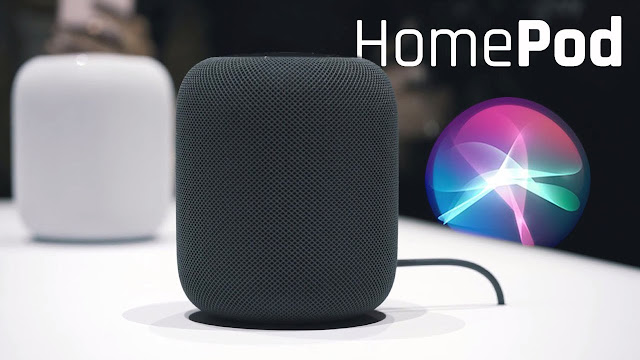
Apple HomePod is the smart speaker that desires to be at the middle of your house audio experience, and that's great news for iPhone and iPad users. 

We got an opportunity to see the HomePod soon after Apple's WWDC keynote in San Jose, but we weren't allowed to touch it. In fact, we couldn't even touch the pristine white table it sat on, and trying to activate it with'Hey, Siri'didn't work either. We tried ... often times, but the program isn't enabled yet. However, we did get an opportunity to listen to the energy of the audio and compare it to the might of the Sonos Play:3 and the Amazon Echo and it's pretty impressive.

Apple HomePod price and release date 


Apple made the argument that the HomePod speaker combines the most effective of the brand new speaker ideas out there. It's both a good speaker and powerful supply of music. For this reason, Apple made the purpose that the buying price of both these items would normally be more costly than the HomePod price. In fact, Apple is suggesting you're obtaining a big discount. So nice, right? Simply how much will it cost? You will end up paying $349 for the brand new Apple speaker, but you won't manage to buy it right away.The release date has been pushed back again to early 2018 in the US, UK and Australia.

HomePod setup


Apple homepod


When you start the HomePod, it wants to learn where it's in space. It'll distribute a 360 beam of sound, seeing if you can find any surfaces nearby, and when it finds it's on a display or perhaps a bookcase will use the wall behind to reflect a different level of sound. 

It's similar functionality to what's offered by Sonos having its multi-room speakers, although this technique utilizes you travelling the speaker's room with a telephone that then uses its microphone to gauge the space. 

The HomePod may also automatically work-out whether there's another speaker nearby, and will connect with it and balance the sound to be sure the two will work well in tandem.Pairing your Apple device involves simply holding it close to the speaker in quite similar way as the AirPods. Apple is yet to confirm whether you can use non-Apple devices with the speaker. 

HomePod audio performance


Let's Talk about HomePod


We were fortunate to experience the HomePod doing his thing to listen to the audio performance before it launches later in the year - and to sonically compare it to the Sonos Play:3 and the Amazon Echo. The Play:3 will set you back $299 (so very little less with regards to cost, and isn't voice-enabled) and the Amazon Echo will surely cost $180 - which is a fair amount cheaper than the $349 Apple is asking. But how do they sound compared together? Well, the HomePod is easily the most effective of the three with regards to efficiency - but you'd expect that given additionally it is probably the most expensive. 

The first song we heard - Sia's The Greatest - featured impressive vocal performance, with an extensive and clear sound that flooded the room. 

However, the bass was far too punchy, almost pulsing, with this particular song, and while the Sonos was more muted vocally it offered a gentler bass and an arguably easier sound with this particular song.

The Amazon Echo sounded tinny in comparison too, but for the price and shape this is almost to be expected. Next up was Norah Jones with Sunrise, a far more vocal-powered track, and travelling the room the HomePod delivered well-radiated sound. On this track, without a lot of bass, the Echo sounded not half-bad either, which makes it feel OK value for money. With Stevie Wonder's Superstition, the Play:3 and HomePod matched up the same way as Sia's first song - the bass pulsing a bit harder on Apple's speaker, and Sonos sounding more soft.

 However, the width and dynamism of the HomePod really pushed the song sonically, which makes it seem like an infinitely more expansive device. And curiously, Apple's speaker sounded great on the bass-heavy DNA by Kendrick Lamar, the 4-inch woofer inside the device combining very well with the vocals to supply a definite performance. The Sonos Play:3 wasn't remote, nevertheless the chorus sounded more boxed-in.

The most impressive performance from the HomePod came once we heard two together to hear The Eagles'Hotel California recorded live.Both speakers created a soundscape so loud and clear so it felt like being there, the audience's screams melting into the backdrop and the guitar feeling genuinely stage left even though there is no visual cue. It would have been interesting to listen to this against stereo Sonos speakers, nevertheless the HomePod proved it had been more than a capable speaker with this particular performance alone. 

HomePod size and features


Apple homepod


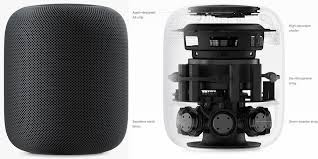
HomePod has been designed to become a 7-inch with a 4-inch upward-facing woofer that Apple promises will rock almost any room with distortion-free audio. It will help this thing has 7 beam-forming tweeters in its base. 

We could actually extend our index finger and thumb and almost span the whole speaker, which, based on the HomePod specs, is just under seven inches tall. That makes it a bit taller than the portly Google Home, and slightly shorter than canister-shaped Amazon Echo. But it's more than simply a noisy wireless speaker. 

Apple has Siri baked into it, which explains why everybody was calling it the Apple Siri Speaker before today's launch event. Which means it will have the ability to answer inquiries like the Home and Echo, what's more, it's planning to be the best iPhone and iPad associated speaker around. 

Early decision 


While regardless we're holding up to attempt the execution of the HomePod's voice acknowledgment and communication, the sonic execution demonstrated Apple has made something that is effortlessly a match for Sonos'famed speakers. 

Given the execution it's over something, for example, the Amazon Echo, if Apple can enhance Siri to a notwithstanding moving toward Alexa then the HomePod would have been a convincing purchase. 

It is a disgrace it sounded so great with two, in ways - the cost is entirely high on the off chance that you need to get a double set, regardless it practically appears to be justified, despite all the trouble even just at that beginning time. 

It's difficult to state why Apple has given a before take a gander at a speaker not seeking a half year, but rather it's presumable intending to need to dispatch it close to the occasions and flaunting the execution now will doubtlessly shield others from putting resources into an adversary for a friend or family member. 

We're quick to test the voice execution with this to watch finish the HomePod can be as a house speaker and right hand - yet the early execution is really encouraging.